Tutorial: Connection via Remote Host
Sometimes it is useful to be able to configure a modem, which is connected to a remote host, like shown below:
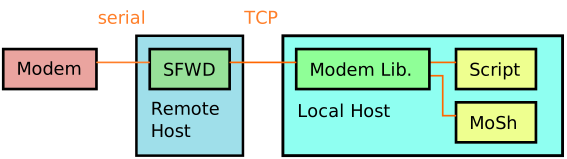
Such a setup can be realized via the app sfwd.py of the PyLib.
A potential use case is that you have several modems connected to an individual Raspberry Pi each. If the Pis are connected to your local wired or wireless network, you can use a single computer to access all modems without physical access to the Pis or even modems.
Serial Forwarder
The serial forwarder is a simple server application that connects to an ahoi modem on a serial port and a remote computer via TCP. Data received over TCP is forwarded to the serial port, and data received from the serial port is transmitted over TCP.
To start sfwd.py, open a terminal window and navigate to the PyLib folder. Next, type
python3 apps/sfwd/sfwd.py
2464 (which is the word ahoi typed on ancient mobile phones).
Security
The communication between server and client is unprotected. If necessary, you have to secure the connection on your own, by using a VPN or allow local access only for example.
Connect to Serial Forwarder
The MoSh can connect to a serial forwarder instead of a serial port.
Start the MoSh with the (optional) parameter of form tcp@IP[:PORT]:
python3 apps/mosh/mosh.py tcp@IP[:PORT]
IP with the IP address of the network device running a serial forwarder that you want to connect to.
Omit or replace PORT with the TCP port of the serial forwarder.
Example
python3 apps/mosh/mosh.py tcp@192.168.1.50:2464
Port scanner (optional)
To search the network for a running serial forward server, you can use apps/sfwd/sfwdScan.py from PyLib.
This script tests all IP addresses in your local subnet.
Example
If you are connected to a network with the IP address 192.168.1.xx, the range from 192.168.1.1 to 192.168.1.255 will be tested.
If a running serial forward server is found, the address is marked with a *.